News

Monday, October 06, 2014

FlashFXP 5.0.0 build 3777

FlashFXP 5.0.0 build 3777

FlashFXP is a powerful FTP client for Windows. With its intuitive and customizable user interface, Flash FXP provides the fastest and easiest way to transfer or backup files between your local computer and a remote server, or directly between two servers. In addition to FTP, FlashFXP provides additional security with SFTP (Secure Shell/SSH), FTPS ...

8 Android Wear tweaks that Google should steal from third-party apps

8 Android Wear tweaks that Google should steal from third-party apps

While Android Wear shows some flashes of brilliance in delivering actionable notifications to your wrist, the OS is still pretty rough around the edges.

Ideally, Google will get around to adding features and fixing questionable design decisions in the coming months and years. But in the meantime, a handful of third-party tweaks can make Android Wear just a bit better. Here's what we'd ultimately like to see from Google's wearable OS, along with some improvements you can make today:

Get alerts when you forget your phone

findmyphone android wear

Find My Phone helps prevent the awkwardness of leaving the house with your watch on your wrist, but your phone on the table.

To read this article in full or to leave a comment, please click here

5 powerful things you didn't know Chromebooks could do

5 powerful things you didn't know Chromebooks could do

The now-familiar knock seemingly started when the very first Googley laptop rolled off the line. "Sure, Chromebooks are nice, but they can't run Photoshop."

Well, that just isn't true anymore. Nor are many other Chromebook myths.

From Photoshop to Office and beyond, here are five powerful things you might be surprised to learn you can do with a Chromebook.

1. Edit images with Adobe Photoshop

Adobe and Google recently announced they'd be making Photoshop available as a streaming Chrome app. This means Photoshop will work on Chrome OS, and even in Chrome on desktop Linux! To do this, the Windows version of Chrome will run on Adobe's servers and be streamed to your Chrome web browser.

To read this article in full or to leave a comment, please click here

Dell XPS 18 review: A near-perfect hybrid of Windows tablet and all-in-one desktop

Dell XPS 18 review: A near-perfect hybrid of Windows tablet and all-in-one desktop

I've taken to calling oversized tablet/all-in-one PC hybrids such as Dell's XPS 18 "tabletop tablets," and the XPS is the crème de la crème of that category. It's just the right size and weight to move easily around the house, it's equipped with a gorgeous 18.4-inch touchscreen display, and it comes with a charging stand for those times you want it to remain stationary.

But as much as I like the XPS 18, it's not perfect. The configuration I prefer—with a nimble Intel Core i74510U processor, 8MB of DDR3L/1600 memory, and a speedy 256GB SSD—costs a pretty penny: $1500, to be exact. Dell offers three less-expensive models (same display, but with slower processors, less memory, mechanical hard drives—and in one case—no charging stand), but I'm sure they don't deliver the same kick.

To read this article in full or to leave a comment, please click here

Sunday, October 05, 2014

ACDSee 18.0.0.226

ACDSee 18.0.0.226

ACDSee - the most powerful photo manager around is now even faster. Way faster. No other photo software saves you so much time. Enjoy the freedom to find, organize and edit your photos faster, easier and with better results than ever before. Instantly share your pictures online or on your cell phone. Create quality prints or Flash and PDF slideshow...

phpMyAdmin 4.2.9.1

phpMyAdmin 4.2.9.1

phpMyAdmin is a free software tool written in PHP intended to handle the administration of MySQL over the World Wide Web. phpMyAdmin supports a wide range of operations with MySQL.

KeePass 1.28

KeePass 1.28

KeePass is a free open source password manager, which helps you to manage your passwords in a secure way. You can put all your passwords in one database, which is locked with one master key or a key file. So you only have to remember one single master password or select the key file to unlock the whole database. The databases are encrypted using th...

SpeedCommander 15.40.7700

SpeedCommander 15.40.7700

Need a better file manager than Windows Explorer? SpeedCommander's many features go far beyond copying or moving files and folders. The program easies any file operations through its two window technology, file compression and extraction (ZIP, RAR, ARJ, 7z), Macros, and FTP and network drive support. Additional tasks include secure deletion, synchr...

Vista Codec Package 6.7.8

Vista Codec Package 6.7.8

All the codecs you need for Vista to play AVIs, DVDs and more!

Windows 7 Codecs Advanced 4.7.9

Windows 7 Codecs Advanced 4.7.9

All the codecs you need for Windows 7 to play AVIs, DVDs and more!

Avira Free Antivirus 14.0.7.306

Avira Free Antivirus 14.0.7.306

Avira AntiVir Personal - FREE Antivirus is a reliable free antivirus solution, that constantly and rapidly scans your computer for malicious programs such as viruses, Trojans, backdoor programs, hoaxes, worms, dialers etc. Monitors every action executed by the user or the operating system and reacts promptly when a malicious program is detected.

Debian GNU/Linux

Debian GNU/Linux, more usually just called "Debian," is an operating system distribution or "distro" where the kernel can be either Linux or kFreeBSD (the FreeBSD kernel). Wikipedia notes that "… there are 1,276 times as many Linux users as there are kFreeBSD users." Adventurous geeks might also like to try the unofficially supported multi-server microkernel called GNU HURD. The distro is free and open source mostly under the GNU General Public License.
The Debian project began in 1993 and the first release was in 1996. The most recent release, version 7.6, codenamed "Wheezy", was released on July 12, 2014. The next release, version 8, codenamed "Jessie", is currently in Beta 1 release.
Ports of Debian are available for Intel i386 and above, Alpha, ARM, Intel IA-64, Motorola 68k, MIPS, PA-RISC, PowerPC, Sparc, UltraSparc, IBM S/390, and Hitachi SuperH. The recommended minimum RAM for server implementations is 64MB although 256MB is recommended while 128MB minimum and 512MB is recommended for desktop systems. Installation is available through CD and DVD images and "live" systems can be booted from CD, DVD, or USB drives.
More @:networkworld

StorPool – A Toolkit for Cloud Application Providers

StorPool is a software defined storage solution targeted at cloud application and infrastructure providers. The software runs on a cluster of commodity servers, aggregating the internal storage of those servers into a shared volume. The solution, for now, is only compatible with Linux based systems. For many online application or cloud providers this should not be an issue.

What makes the StorPool solution unique is the flexibility that permeates every aspect of the product. For example, many converged solutions require a lockstep addition of storage and compute. Each time you need to add capacity or processing power you have to buy both, in the form of another server, fully loaded. Most data centers, especially service providers, don't scale that way. There are times when they need to scale just the compute aspects of their infrastructures and others where they simply need more storage.

StorPool customers can use a converged infrastructure when the data center needs both compute and storage resources. But, if one is needed more than the other, the organization can add dedicated storage nodes or dedicated clients (hosts with no storage). This ability to mix and match between converged, dedicated compute or dedicated storage is rare.

Read more at Storage Switzerland.

Friday, October 03, 2014

IT Security a Primary Concern for Businesses

Mobility-related applications and strategies are the biggest sticking points, with cloud also scoring high.

Elementary OS 'Freya' Is Worth the Wait

Elementary OS is a new style Linux distro that wraps its own sophisticated desktop design around a solid Ubuntu core. This distro first appeared in 2011. Its developers released the second major version, Elementary OS Luna, last year. The latest weeks-old beta release of what will be the third major...

IBM's New Server Plan: Take on Intel, Ride OpenPower

Now that IBM has sold its Intel-based server business to Lenovo, Big Blue is taking the gloves off and trying to take business from the chip giant by positioning its Power8 processors as a more open option.

ubuntu-security-announce Digest, Vol 121, Issue 2

Send ubuntu-security-announce mailing list submissions to
ubuntu-security-announce@lists.ubuntu.com

To subscribe or unsubscribe via the World Wide Web, visit
https://lists.ubuntu.com/mailman/listinfo/ubuntu-security-announce
or, via email, send a message with subject or body 'help' to
ubuntu-security-announce-request@lists.ubuntu.com

You can reach the person managing the list at
ubuntu-security-announce-owner@lists.ubuntu.com

When replying, please edit your Subject line so it is more specific
than "Re: Contents of ubuntu-security-announce digest..."


Today's Topics:

1. [USN-2367-1] OpenSSL update (Marc Deslauriers)
2. [USN-2368-1] OpenVPN vulnerability (Marc Deslauriers)
3. [USN-2369-1] file vulnerability (Seth Arnold)


----------------------------------------------------------------------

Message: 1
Date: Thu, 02 Oct 2014 12:59:22 -0400
From: Marc Deslauriers <marc.deslauriers@canonical.com>
To: ubuntu-security-announce@lists.ubuntu.com
Subject: [USN-2367-1] OpenSSL update
Message-ID: <542D846A.3000102@canonical.com>
Content-Type: text/plain; charset="utf-8"

==========================================================================
Ubuntu Security Notice USN-2367-1
October 02, 2014

openssl update
==========================================================================

A security issue affects these releases of Ubuntu and its derivatives:

- Ubuntu 12.04 LTS

Summary:

OpenSSL TLSv1.2 support has been improved.

Software Description:
- openssl: Secure Socket Layer (SSL) cryptographic library and tools

Details:

For compatibility reasons, OpenSSL in Ubuntu 12.04 LTS disables TLSv1.2
by default when being used as a client. When forcing the use of TLSv1.2,
another compatibility feature (OPENSSL_MAX_TLS1_2_CIPHER_LENGTH) was used
that would truncate the cipher list. This would prevent certain ciphers
from being selected, and would prevent secure renegotiations. This update
removes the cipher list truncation workaround when forcing the use of
TLSv1.2.

Update instructions:

The problem can be corrected by updating your system to the following
package versions:

Ubuntu 12.04 LTS:
libssl1.0.0 1.0.1-4ubuntu5.18

After a standard system update you need to reboot your computer to make
all the necessary changes.

References:
http://www.ubuntu.com/usn/usn-2367-1
https://launchpad.net/bugs/1376447

Package Information:
https://launchpad.net/ubuntu/+source/openssl/1.0.1-4ubuntu5.18


-------------- next part --------------
A non-text attachment was scrubbed...
Name: signature.asc
Type: application/pgp-signature
Size: 819 bytes
Desc: OpenPGP digital signature
URL: <https://lists.ubuntu.com/archives/ubuntu-security-announce/attachments/20141002/92180c4e/attachment-0001.pgp>

------------------------------

Message: 2
Date: Thu, 02 Oct 2014 13:42:28 -0400
From: Marc Deslauriers <marc.deslauriers@canonical.com>
To: ubuntu-security-announce@lists.ubuntu.com
Subject: [USN-2368-1] OpenVPN vulnerability
Message-ID: <542D8E84.6020903@canonical.com>
Content-Type: text/plain; charset="utf-8"

==========================================================================
Ubuntu Security Notice USN-2368-1
October 02, 2014

openvpn vulnerability
==========================================================================

A security issue affects these releases of Ubuntu and its derivatives:

- Ubuntu 12.04 LTS

Summary:

OpenVPN could be made to expose sensitive information over the network.

Software Description:
- openvpn: virtual private network software

Details:

It was discovered that OpenVPN incorrectly handled HMAC comparisons when
running in UDP mode. If a remote attacker were able to perform a
man-in-the-middle attack, this flaw could possibly be used to perform a
plaintext recovery attack.

Update instructions:

The problem can be corrected by updating your system to the following
package versions:

Ubuntu 12.04 LTS:
openvpn 2.2.1-8ubuntu1.3

In general, a standard system update will make all the necessary changes.

References:
http://www.ubuntu.com/usn/usn-2368-1
CVE-2013-2061

Package Information:
https://launchpad.net/ubuntu/+source/openvpn/2.2.1-8ubuntu1.3


-------------- next part --------------
A non-text attachment was scrubbed...
Name: signature.asc
Type: application/pgp-signature
Size: 819 bytes
Desc: OpenPGP digital signature
URL: <https://lists.ubuntu.com/archives/ubuntu-security-announce/attachments/20141002/1857b2d3/attachment-0001.pgp>

------------------------------

Message: 3
Date: Thu, 2 Oct 2014 19:04:02 -0700
From: Seth Arnold <seth.arnold@canonical.com>
To: ubuntu-security-announce@lists.ubuntu.com
Subject: [USN-2369-1] file vulnerability
Message-ID: <20141003020402.GA22250@hunt>
Content-Type: text/plain; charset="us-ascii"

==========================================================================
Ubuntu Security Notice USN-2369-1
October 03, 2014

file vulnerability
==========================================================================

A security issue affects these releases of Ubuntu and its derivatives:

- Ubuntu 14.04 LTS
- Ubuntu 12.04 LTS
- Ubuntu 10.04 LTS

Summary:

file could be made to crash or run programs as your login if it
opened a specially crafted file.

Software Description:
- file: Tool to determine file types

Details:

It was discovered that file incorrectly handled certain CDF documents. A
attacker could use this issue to cause file to hang or crash, resulting
in a denial of service.

Update instructions:

The problem can be corrected by updating your system to the following
package versions:

Ubuntu 14.04 LTS:
file 1:5.14-2ubuntu3.2

Ubuntu 12.04 LTS:
file 5.09-2ubuntu0.5

Ubuntu 10.04 LTS:
file 5.03-5ubuntu1.4

In general, a standard system update will make all the necessary changes.

References:
http://www.ubuntu.com/usn/usn-2369-1
CVE-2014-3587

Package Information:
https://launchpad.net/ubuntu/+source/file/1:5.14-2ubuntu3.2
https://launchpad.net/ubuntu/+source/file/5.09-2ubuntu0.5
https://launchpad.net/ubuntu/+source/file/5.03-5ubuntu1.4

-------------- next part --------------
A non-text attachment was scrubbed...
Name: signature.asc
Type: application/pgp-signature
Size: 473 bytes
Desc: Digital signature
URL: <https://lists.ubuntu.com/archives/ubuntu-security-announce/attachments/20141002/1124c107/attachment-0001.pgp>

------------------------------

--
ubuntu-security-announce mailing list
ubuntu-security-announce@lists.ubuntu.com
Modify settings or unsubscribe at: https://lists.ubuntu.com/mailman/listinfo/ubuntu-security-announce


End of ubuntu-security-announce Digest, Vol 121, Issue 2
********************************************************

Thursday, October 02, 2014

CLI Intro: Useful General-Purpose Commands

This tutorial is the second part of the introduction to Linux command-line. In the first chapter I tried to make a brief introduction to the shell and the basic ways of moving around. Here I will talk about several useful commands, which may be needed on a day to day basis if you're working with the shell.


Working with Files and Directories

Creating Directories

The command to create new directories (also called folders) is mkdir. For example, to create a directory called booksinside your home directory, you would issue the following command:

mkdir books

Renaming Files

In Linux, renaming a file is done via the mvcommand, which stands for 'move'. The general format of the command is:

mv SOURCE DESTINATION

So, if for example you would like to rename the directory created previously, books to mybooks2, you would issue the following command:

mv books mybooks2

Copying Files

The command for copying files and directories is cp. For example, to copy the file /etc/network/interfaces to you home directory you could write the following:

cp /etc/network/interfaces /home/USER

Make sure to replace USER with your username. Or, if we keep in mind that ~is automatically expanded into the home directory of the current user:

cp /etc/network/interfaces ~

And if your current working directory is already your home directory (e.g. /home/USER):

cp /etc/network/interfaces .

The character .expands into the current directory. See the first chapter to see more details on this. You could even use environment variables, which expand into a certain string. In the following example, the variable $HOME holds the path to your home directory:

cp /etc/network/interfaces $HOME
You may have noticed that if you copy a file to a path that ends in a directory (e.g. /home/USER), the file will be copied inside the respective directory, it will not delete nor replace it.

You can copy more than one file at a time, the last argument being the directory where you want the files to be copied:

cp myfile1 myfile2 myfile3 ~/books

This command will copy myfile1, myfile2 and myfile3 from the current working directory into the booksfolder, located inside your home path.

Copying Directories

Directories can be copied in the same fashion as files, only this time we will use the -r switch. This tells the cpcommand to copy directories recursively, meaning all the sub-folders and files of the specified directory.

cp -r Documents ~/books

This command will copy the Documents folder from the current directory inside the booksdirectory located in your home path.

Creating Files

To create empty files, you can use the touchcommand. In a later chapter I will discuss on how to create and edit or modify text files with various editors.

touch myfile

Removing Files

To delete a file, you would use the rmcommand:

rm myfile

To delete a directory, you will also need the -rswitch:

rm -r mybooks

Adding Users

Adding a New User

The command is adduser which is a user-friendly wrapper for the useraddcommand. More on administrating users and groups in a later chapter.

Other Commands

View the Current Date and Time

Use the datecommand for displaying the date and time:

$ date  Thu Oct  2 16:32:58 EEST 2014  

In addition, you can use format specifiers to display the date and time differently. For example, you could use the %Y (year), %b (abbreviated month name), %d (number of the day, two digits), %H (hour, 24-hour format), %M (minute), %S (second):

$ date +"%Y %b %d %H:%M:%S"  2014 Oct 02 16:58:44  

To change the date and time, use the --setswitch:

sudo date +"%H%M" --set="1656"

The above command will change the hour and minute to 16:56.

Calendar

The calcommand will display an ASCII calendar of the current month, and will highlight the current day:

Show Your Username

The whoami command will print the username currently logged in. Additionally, you can use the echo $USERcommand, which will use the $USER environment variable to echo (print) its value:

Print System Information

For this we will use the uname command with the -aswitch, to show all the information available:

$ uname -a  Linux mint 3.13.0-24-generic #47-Ubuntu SMP Fri May 2 23:31:42 UTC 2014 i686 i686 i686 GNU/Linux  

This shows the kernel version, the date and processor architecture. Except for uname, there are two other commands which print hardware information, lspci which prints all the PCI devices, and inxi, which is a script usually available on Linux Mint systems.

$ inxi  CPU~Dual core Intel Celeron CPU G530 (-MCP-) clocked at 1600.000 Mhz Kernel~3.13.0-24-generic i686 Up~2 days Mem~824.3/3721.2MB HDD~500.1GB(68.9% used) Procs~189 Client~Shell inxi~1.8.4  

inxidisplays extended information about the CPU, kernel, memory, hard-disk space and so on.

Show Uptime

The uptimecommand is used to print for how long the system has been running:

$ uptime   17:21:25 up 2 days, 21:02,  7 users,  load average: 0.28, 0.21, 0.21  

Print Text

The echocommand is used to output text:

$ echo "Hello, world!"  Hello, world!  

You can use the echo -ecommand to interpret special characters (like in C):

$ echo -e "Hello,\t world\!\n\n"  Hello,   world\!  

Here we used a horizontal tab (\t), and two newlines at the end (\n). Notice how the !character is escaped too.

Searching for Commands

Commands and programs usually reside inside the /bin, /sbin and /usr/bin directories. To search for a command in such standard locations, use whereis:

$ whereis cal  cal: /usr/bin/cal /usr/bin/X11/cal /usr/share/man/man1/cal.1.gz  

To search for a command in all the possible locations in your $PATH, use which:

$ which cfgr.sh  /floydb/debconf/scripts/cfgr.sh  
Environment variables such as $HOME, $USER or $PATH are variables which will be expanded (replaced) by the shell with the string that they hold. For example, the $PATH variable contains all the locations in which commands reside, separated by the : character. Try echo $PATH to see it.

Show File Types

Use the typecommand for this:

$ file track01.ogg   track01.ogg: Ogg data, Vorbis audio, stereo, 44100 Hz, ~192000 bps, created by: Xiph.Org libVorbis I (1.1.0 RC1)  $ file cover.png   cover.png: PNG image data, 320 x 317, 8-bit/color RGBA, non-interlaced  

Getting Help

Usually commands have a manual page, so for any command you could use man COMMANDto read a detailed help about what it does and how to use it. The manual page lists all the parameters you can pass to the command. Once you've opened a manual page, you can navigate through it via the arrows, Ctrl+P or Ctrl+N to read the previous and respectively, next line, or Q to quit and close the manual page and return to the shell.

Commands usually have a -h or --help parameter, which will display a short description on what the command does and a compact list of parameters that it takes.

More on getting help in a following chapter.

CLI Intro: Useful General-Purpose Commands

Wednesday, October 01, 2014

Open Source Goes Corporate at Samsung

The list of major corporations getting involved with open source communities is persistently growing, a trend evidenced by the rapidly expanding financial backing of open source foundations like the Linux Foundation. Samsung is one of these companies through its Open Source Group which was established in February of 2013. It's...

Secure Your Linux Desktop and SSH Login Using Two Factor Google Authenticator

It is a little known fact that you can use the Time-based One-Time Password (TOTP) algorithm to secure your user accounts in Linux systems. 

New Linux Foundation Certification Review Guide Available for Free

Last month we announced the Linux Foundation Certified Engineer and Sys Admin exams that you can take anytime, anywhere through your computer. We created this program because we know Linux talent exists everywhere and we want everyone to be able to showcase that talent through a performance-based, challenging exam that focuses on what you do everyday as a Sys Admin.

Borderlands 2 Released For Linux With A Sale

 GamingOnLinux: The day has landed folks. Borderlands 2 is now officially available for Linux and it brings us some excellent FPS action.

NVIDIA Issues Updated 340.46 Long-Lived Driver Release

NVIDIA on Tuesday released an updated Linux x86/x86_64/ARM graphics driver in their 340.xx long-lived branch...

Linux Calendar App California 0.2 Released

OMGUbuntu: Following on from last month's update to Geary and Shotwell the non-profit software outfit Yorba is back, this time with a new release of their California calendaring application.

Mir 0.8 Works On Less ABI Breakage, Touchspots, Responsiveness

While Ubuntu 14.10 on the desktop isn't using Mir by default, Mir 0.8.0 is being prepared for release by Canonical and it has a number of interesting changes...

[$] How Implementation Details Become ABI: A Case Study

One of the final changes that went into the mainline kernel repository before the 3.17-rc7 release was this fix from Mikhail Efremov. It affects some low-level code within the virtual filesystem layer that manages name changes in the dentry structure — the structure that handles the mapping between file names...

Adobe Pulls Linux PDF Reader Downloads From Website

OMGUbuntu: Things are about to get tricky for anyone needing to use Adobe's own PDF reader application on Linux, as the company has pulled the software from download.

Security Bug in Xen May Have Exposed Amazon, Other Cloud Services

The Xen Project has published a security advisory that could affect millions of virtualized servers running in Amazon's cloud and other public hosting services. 

Rackspace Joined Amazon in Patching, Rebooting Cloud Servers

About a quarter of Rackspace's 200,000-plus customers were impacted when the cloud provider had to patch a flaw in the Xen hypervisor.

The Path to Full-Time Open Source

Mike Perham: Two years ago today I released Sidekiq Pro, my commercial extension to Sidekiq, as an experiment to see if I could make OSS development financially viable for individual developers.

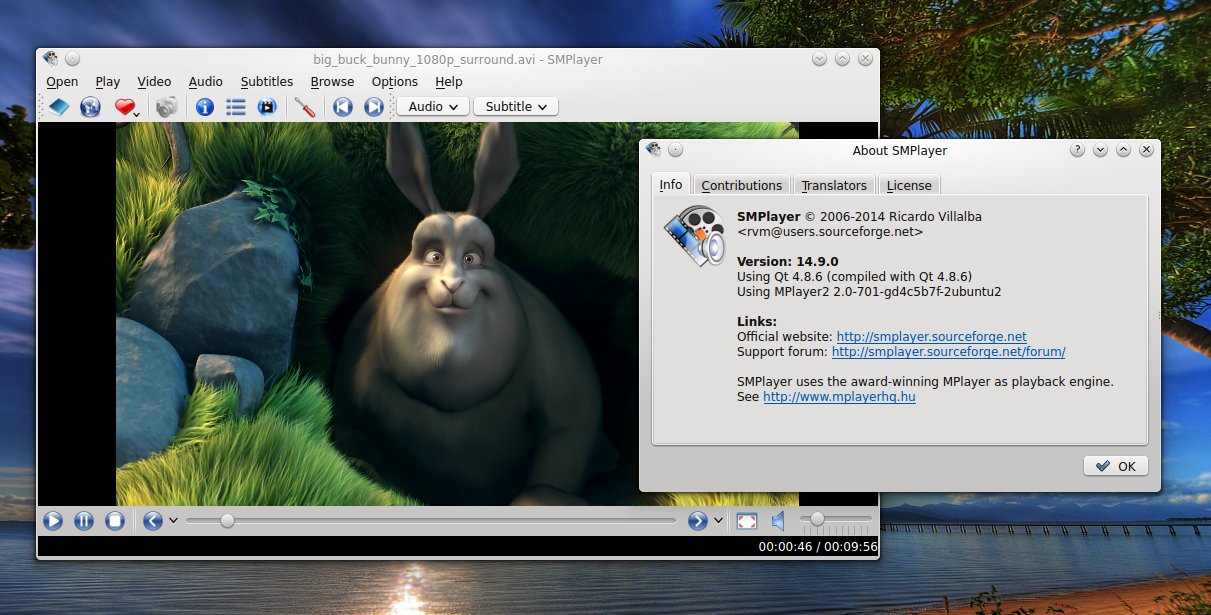
SMPlayer 14.9 Review – One of the Best Movie Players for Linux

SMPlayer is a powerful video player for Linux and Windows, based on MPlayer, with countless features and options. Together with VLC, I believe there is no match for it when it comes to movie players.

smplayer00

In this article I will overview the main things that make SMPlayer stand out of the crowd, putting it on the top of the video playback applications list. SMPlayer is written in Qt 4.8 and uses MPlayer2 for video playback. Personally I have only words of praise for this player, which is why I decided to write this review. So let's proceed and see what the most important features of SMPlayer are.

SMPlayer 14.9 Review – One of the Best Movie Players for Linux

ubuntu-security-announce Digest, Vol 121, Issue 1

Send ubuntu-security-announce mailing list submissions to
ubuntu-security-announce@lists.ubuntu.com

To subscribe or unsubscribe via the World Wide Web, visit
https://lists.ubuntu.com/mailman/listinfo/ubuntu-security-announce
or, via email, send a message with subject or body 'help' to
ubuntu-security-announce-request@lists.ubuntu.com

You can reach the person managing the list at
ubuntu-security-announce-owner@lists.ubuntu.com

When replying, please edit your Subject line so it is more specific
than "Re: Contents of ubuntu-security-announce digest..."


Today's Topics:

1. [USN-2366-1] libvirt vulnerabilities (Marc Deslauriers)


----------------------------------------------------------------------

Message: 1
Date: Tue, 30 Sep 2014 14:16:32 -0400
From: Marc Deslauriers <marc.deslauriers@canonical.com>
To: ubuntu-security-announce@lists.ubuntu.com
Subject: [USN-2366-1] libvirt vulnerabilities
Message-ID: <542AF380.50702@canonical.com>
Content-Type: text/plain; charset="utf-8"

==========================================================================
Ubuntu Security Notice USN-2366-1
September 30, 2014

libvirt vulnerabilities
==========================================================================

A security issue affects these releases of Ubuntu and its derivatives:

- Ubuntu 14.04 LTS
- Ubuntu 12.04 LTS
- Ubuntu 10.04 LTS

Summary:

Several security issues were fixed in libvirt.

Software Description:
- libvirt: Libvirt virtualization toolkit

Details:

Daniel P. Berrange and Richard Jones discovered that libvirt incorrectly
handled XML documents containing XML external entity declarations. An
attacker could use this issue to cause libvirtd to crash, resulting in a
denial of service on all affected releases, or possibly read arbitrary
files if fine grained access control was enabled on Ubuntu 14.04 LTS.
(CVE-2014-0179, CVE-2014-5177)

Luyao Huang discovered that libvirt incorrectly handled certain blkiotune
queries. An attacker could use this issue to cause libvirtd to crash,
resulting in a denial of service. This issue only applied to Ubuntu 12.04
LTS and Ubuntu 14.04 LTS. (CVE-2014-3633)

Update instructions:

The problem can be corrected by updating your system to the following
package versions:

Ubuntu 14.04 LTS:
libvirt-bin 1.2.2-0ubuntu13.1.5
libvirt0 1.2.2-0ubuntu13.1.5

Ubuntu 12.04 LTS:
libvirt-bin 0.9.8-2ubuntu17.20
libvirt0 0.9.8-2ubuntu17.20

Ubuntu 10.04 LTS:
libvirt-bin 0.7.5-5ubuntu27.25
libvirt0 0.7.5-5ubuntu27.25

After a standard system update you need to reboot your computer to make
all the necessary changes.

References:
http://www.ubuntu.com/usn/usn-2366-1
CVE-2014-0179, CVE-2014-3633, CVE-2014-5177

Package Information:
https://launchpad.net/ubuntu/+source/libvirt/1.2.2-0ubuntu13.1.5
https://launchpad.net/ubuntu/+source/libvirt/0.9.8-2ubuntu17.20
https://launchpad.net/ubuntu/+source/libvirt/0.7.5-5ubuntu27.25


-------------- next part --------------
A non-text attachment was scrubbed...
Name: signature.asc
Type: application/pgp-signature
Size: 819 bytes
Desc: OpenPGP digital signature
URL: <https://lists.ubuntu.com/archives/ubuntu-security-announce/attachments/20140930/42363314/attachment-0001.pgp>

------------------------------

--
ubuntu-security-announce mailing list
ubuntu-security-announce@lists.ubuntu.com
Modify settings or unsubscribe at: https://lists.ubuntu.com/mailman/listinfo/ubuntu-security-announce


End of ubuntu-security-announce Digest, Vol 121, Issue 1
********************************************************

Tuesday, September 30, 2014

Through Microservices, a Renewed Push for Simplicity and IT Minimalism

Guerrilla SOA redux? PwC consultants recommend lighter, simpler, faster services to keep up with business demands.

Intel, Cisco, HP, Others Form NFV Consortium

The OPNFV will be a project at the Linux Foundation to create an open-source reference platform for NFV.

Arduino to Sell 3D Printer—$800 in Kit Form or $1,000 Pre-Assembled

Arduino Arduino, maker of the open source hardware platform of the same name, is teaming up with a startup called Sharebot to sell a 3D printer for about $1,000. Announced today, Materia 101 will be demonstrated at the Maker Faire in Rome this weekend. An on-sale date has not been revealed.

Piston’s McKenty to Leave Company He Founded for Pivotal

The New Stack: Josh McKenty, founder of Piston and an early architect of what became OpenStack, announced today that he's leaving the company he started to take on a new role at Pivotal.

Chromecast Getting Competition from Firefox OS-Powered Matchstick

The streaming stick market is apparently heating up. Google, Microsoft, and Amazon all have entrants in this space, and if a new Kickstarter appeal succeeds, there will soon be a Firefox OS stick getting in on the action.

Facebook has Over 200 Open Source Projects on GitHub

Facebook. It's one of the world's most well-known tech companies and on the forefront of open source technology. Just take a look their portfolio of over 200 open source projects on GitHub. In this interview with James Pearce, head of Open Source at Facebook, I speak with him prior to...

Distribution Release: CentOS 5.11

Johnny Hughes has announced the release of CentOS 5.11, the distribution's final release in the 5.x branch.

Apache Storm is Ready for Prime Time

Storm, a real-time framework for dealing with Big Data, has become an Apache top level project.

Scribbleton Has a Ton of Potential

Scribbleton is a very infant -- as in alpha -- release of an innovative note-taking app for Linux that provides cross-platform access with Windows and Apple computers. It creates a personal wiki for storing everything from quick notes to detailed checklists to outlines. It creates links between pages in Scribbleton.

eBay, PayPal Breakup an OpenStack Private Cloud Split Too

eBay and PayPal are both on the OpenStack bandwagon. The PayPal spin-off will highlight how easy or difficult it will be to break up an OpenStack private cloud.

VMware's Role in OpenStack: A Second Look

I had believed that VMware took part in the OpenStack community because it was dragged there by its customers. Boy, I was wrong. VMware's Dan Wendlandt helps set me straight.

Bringing Together a Disconnected Team

How do you connect remote workers together for better culture?

Fedora Might Try A New Scheduling Strategy For Its Releases

It's no secret that Fedora has had a challenging time sticking to their release schedules for a long time. With taking care of blocker bugs, Fedora Linux releases tend to frequently slip -- with Fedora 21 it's about two months behind schedule and we're just past the alpha stage. By...

Ten Fastest-Growing IT Skills Offer Opportunities

Baseline: If you want to move ahead in your career, it's important to command a skill that will enable you to write your own ticket in terms of job opportunities.

Open Sourcing Automation Tools for Testing Linux Images on Microsoft Azure

Openness at Microsft Blog: Microsoft has participated in the Linux community for several years now, contributing drivers for Hyper-V to the Linux kernel source code base, and then working with Linux distribution partners to incorporate those drivers into their distros. We've had great results in running a variety of Linux distros as a guest OS on Hyper-V and as a VM in Microsoft Azure, and our collaboration with SUSE...

NVIDIA GeForce GTX 980: The Best GPU For Linux Gamers

Earlier this month NVIDIA launched the GeForce GTX 970 and GTX 980 as their highest-end offerings based on their Maxwell architecture. Since the GTX 750 series debut I have been anxious to see Maxwell succeed Kepler in the high-end space and finally last week I got hands on time with...

Open Source Drives Innovation in Another Multi-Billion Dollar Market: World’s Largest Carriers, Vendors to Bring Virtualization

The Linux Foundation today is announcing a new Collaborative Project, Open Platform for NFV, or OPNFV. It involves nearly 40 companies and has largely been driven by end users like AT&T, China Mobile, NTT DOCOMO, Telecom Italia and Vodafone, among others. Together this community aims to build a carrier-grade, integrated, open source reference platform to accelerate Network Function Virtualization. 

ubuntu-security-announce Digest, Vol 120, Issue 19

Send ubuntu-security-announce mailing list submissions to
ubuntu-security-announce@lists.ubuntu.com

To subscribe or unsubscribe via the World Wide Web, visit
https://lists.ubuntu.com/mailman/listinfo/ubuntu-security-announce
or, via email, send a message with subject or body 'help' to
ubuntu-security-announce-request@lists.ubuntu.com

You can reach the person managing the list at
ubuntu-security-announce-owner@lists.ubuntu.com

When replying, please edit your Subject line so it is more specific
than "Re: Contents of ubuntu-security-announce digest..."


Today's Topics:

1. [USN-2365-1] LibVNCServer vulnerabilities (Marc Deslauriers)


----------------------------------------------------------------------

Message: 1
Date: Mon, 29 Sep 2014 13:12:58 -0400
From: Marc Deslauriers <marc.deslauriers@canonical.com>
To: ubuntu-security-announce@lists.ubuntu.com
Subject: [USN-2365-1] LibVNCServer vulnerabilities
Message-ID: <5429931A.1030100@canonical.com>
Content-Type: text/plain; charset="utf-8"

==========================================================================
Ubuntu Security Notice USN-2365-1
September 29, 2014

libvncserver vulnerabilities
==========================================================================

A security issue affects these releases of Ubuntu and its derivatives:

- Ubuntu 14.04 LTS
- Ubuntu 12.04 LTS

Summary:

Several security issues were fixed in LibVNCServer.

Software Description:
- libvncserver: vnc server library

Details:

Nicolas Ruff discovered that LibVNCServer incorrectly handled memory when
being advertised large screen sizes by the server. If a user were tricked
into connecting to a malicious server, an attacker could use this issue to
cause a denial of service, or possibly execute arbitrary code.
(CVE-2014-6051, CVE-2014-6052)

Nicolas Ruff discovered that LibVNCServer incorrectly handled large
ClientCutText messages. A remote attacker could use this issue to cause a
server to crash, resulting in a denial of service. (CVE-2014-6053)

Nicolas Ruff discovered that LibVNCServer incorrectly handled zero scaling
factor values. A remote attacker could use this issue to cause a server to
crash, resulting in a denial of service. (CVE-2014-6054)

Nicolas Ruff discovered that LibVNCServer incorrectly handled memory in the
file transfer feature. A remote attacker could use this issue to cause a
server to crash, resulting in a denial of service, or possibly execute
arbitrary code. (CVE-2014-6055)

Update instructions:

The problem can be corrected by updating your system to the following
package versions:

Ubuntu 14.04 LTS:
libvncserver0 0.9.9+dfsg-1ubuntu1.1

Ubuntu 12.04 LTS:
libvncserver0 0.9.8.2-2ubuntu1.1

In general, a standard system update will make all the necessary changes.

References:
http://www.ubuntu.com/usn/usn-2365-1
CVE-2014-6051, CVE-2014-6052, CVE-2014-6053, CVE-2014-6054,
CVE-2014-6055

Package Information:
https://launchpad.net/ubuntu/+source/libvncserver/0.9.9+dfsg-1ubuntu1.1
https://launchpad.net/ubuntu/+source/libvncserver/0.9.8.2-2ubuntu1.1


-------------- next part --------------
A non-text attachment was scrubbed...
Name: signature.asc
Type: application/pgp-signature
Size: 819 bytes
Desc: OpenPGP digital signature
URL: <https://lists.ubuntu.com/archives/ubuntu-security-announce/attachments/20140929/4cdfc4be/attachment-0001.pgp>

------------------------------

--
ubuntu-security-announce mailing list
ubuntu-security-announce@lists.ubuntu.com
Modify settings or unsubscribe at: https://lists.ubuntu.com/mailman/listinfo/ubuntu-security-announce


End of ubuntu-security-announce Digest, Vol 120, Issue 19
*********************************************************

Monday, September 29, 2014

Protect yourself from the big bad shellshock

It has been announced on Wednesday, that a serious vulnerability has been found in the bash program installed on Linux, Unix and MacOSX systems. Because this bug is a hidden open-door to your system, hackers can gain access to your system from the internet, a run programs completely taking over the system.

This is a serious problem, that if not handled quickly, and properly, will cause serious damage to your computer and Internet infrastructures since most of the computers servicing the Internet are running a Linux or Unix OS.

Heed these warnings. Read these links thoroughly and make sure you update your Linux, Unix and MacOS X systems with the latest patch for bash. Start patching immediately.

http://www.zdnet.com/shellshock-better-bash-patches-now-available-7000034115/

http://arstechnica.com/security/2014/09/bug-in-bash-shell-creates-big-security-hole-on-anything-with-nix-in-it/

http://www.linux.com/news/enterprise/systems-management/789720-improved-patch-tackles-new-shellshock-bash-bug-attack-vectors

Web Software vs. Native Linux Software

Both Web-based software and Linux software offer significant costs savings. Is one actually better in the long term?

Tor Executive Director Hints at Firefox Integration

Daily Dot: Is this how the mainstream finally begins to win back its online privacy?

HP Unveils ARM-Based Moonshot Servers

The new systems ramp up ARM's competition with Intel and give data centers greater compute choices.

Eclipse Foundation Delivers Open IoT Stack for Java

The Eclipse IoT community is helping Java developers to connect and manage devices in an IoT solution by delivering an Open IoT Stack for Java.

The Internet Is Broken, and Shellshock Is Just the Start of Our Woes

The year was 1987, and as Fox drove cross-country to his new home, the tapes held a software program called Bash, a tool for the UNIX operating system he had written and tagged with a license that let anyone use the code and even redistribute it to others.

Improved Patch Tackles New Shellshock Bash Bug Attack Vectors

System administrators who spent last week making sure their computers are patched against Shellshock, a critical vulnerability in the Bash Unix command-line interpreter, will have to install a new patch that addresses additional attack vectors.

Cloudflare Just Added SSL Encryption to Two Million Websites for Free

Last year, the web optimization network CloudFlare promised it would double SSL usage on the web in 2014 — and last night, the company made good on its promise. Overnight, CloudFlare deployed its Universal SSL feature, offering free SSL encryption to any site that opted in. All told, that meant...

Shellshock Makes Heartbleed Look Insignificant

The new vulnerability in the Bash shell is the worst we've seen in many years. No software on critical systems can be assumed as safe.

Open, Open, Open: OpenDaylight Helium is Here

Everywhere you turn these days you hear the term "open" in networking. The idea of openness in networking has come a long way in the past year and it's now considered the de facto standard way that we'll achieve interoperability and innovation. 

LibreSSL: More Than 30 Days Later

Ted Unangst has posted an update on LibreSSL development. "Joel and I have been working on a replacement API for OpenSSL, appropriately entitled ressl. Reimagined SSL is how I think of it. Our goals are consistency and simplicity. In particular, we answer the question 'What would the user like to...

Saturday, September 27, 2014

ubuntu-security-announce Digest, Vol 120, Issue 18

Send ubuntu-security-announce mailing list submissions to
ubuntu-security-announce@lists.ubuntu.com

To subscribe or unsubscribe via the World Wide Web, visit
https://lists.ubuntu.com/mailman/listinfo/ubuntu-security-announce
or, via email, send a message with subject or body 'help' to
ubuntu-security-announce-request@lists.ubuntu.com

You can reach the person managing the list at
ubuntu-security-announce-owner@lists.ubuntu.com

When replying, please edit your Subject line so it is more specific
than "Re: Contents of ubuntu-security-announce digest..."


Today's Topics:

1. [USN-2364-1] Bash vulnerabilities (Marc Deslauriers)


----------------------------------------------------------------------

Message: 1
Date: Sat, 27 Sep 2014 05:13:45 -0400
From: Marc Deslauriers <marc.deslauriers@canonical.com>
To: ubuntu-security-announce@lists.ubuntu.com
Subject: [USN-2364-1] Bash vulnerabilities
Message-ID: <54267FC9.2080208@canonical.com>
Content-Type: text/plain; charset="utf-8"

==========================================================================
Ubuntu Security Notice USN-2364-1
September 27, 2014

bash vulnerabilities
==========================================================================

A security issue affects these releases of Ubuntu and its derivatives:

- Ubuntu 14.04 LTS
- Ubuntu 12.04 LTS
- Ubuntu 10.04 LTS

Summary:

Several security issues were fixed in Bash.

Software Description:
- bash: GNU Bourne Again SHell

Details:

Florian Weimer and Todd Sabin discovered that the Bash parser incorrectly
handled memory. An attacker could possibly use this issue to bypass certain
environment restrictions and execute arbitrary code. (CVE-2014-7186,
CVE-2014-7187)

In addition, this update introduces a hardening measure which adds prefixes
and suffixes around environment variable names which contain shell
functions.

Update instructions:

The problem can be corrected by updating your system to the following
package versions:

Ubuntu 14.04 LTS:
bash 4.3-7ubuntu1.4

Ubuntu 12.04 LTS:
bash 4.2-2ubuntu2.5

Ubuntu 10.04 LTS:
bash 4.1-2ubuntu3.4

In general, a standard system update will make all the necessary changes.

References:
http://www.ubuntu.com/usn/usn-2364-1
CVE-2014-7186, CVE-2014-7187

Package Information:
https://launchpad.net/ubuntu/+source/bash/4.3-7ubuntu1.4
https://launchpad.net/ubuntu/+source/bash/4.2-2ubuntu2.5
https://launchpad.net/ubuntu/+source/bash/4.1-2ubuntu3.4


-------------- next part --------------
A non-text attachment was scrubbed...
Name: signature.asc
Type: application/pgp-signature
Size: 819 bytes
Desc: OpenPGP digital signature
URL: <https://lists.ubuntu.com/archives/ubuntu-security-announce/attachments/20140927/b69771a9/attachment-0001.pgp>

------------------------------

--
ubuntu-security-announce mailing list
ubuntu-security-announce@lists.ubuntu.com
Modify settings or unsubscribe at: https://lists.ubuntu.com/mailman/listinfo/ubuntu-security-announce


End of ubuntu-security-announce Digest, Vol 120, Issue 18
*********************************************************

Friday, September 26, 2014

ubuntu-security-announce Digest, Vol 120, Issue 17

Send ubuntu-security-announce mailing list submissions to
ubuntu-security-announce@lists.ubuntu.com

To subscribe or unsubscribe via the World Wide Web, visit
https://lists.ubuntu.com/mailman/listinfo/ubuntu-security-announce
or, via email, send a message with subject or body 'help' to
ubuntu-security-announce-request@lists.ubuntu.com

You can reach the person managing the list at
ubuntu-security-announce-owner@lists.ubuntu.com

When replying, please edit your Subject line so it is more specific
than "Re: Contents of ubuntu-security-announce digest..."


Today's Topics:

1. [USN-2363-1] Bash vulnerability (Marc Deslauriers)
2. [USN-2363-2] Bash vulnerability (Marc Deslauriers)


----------------------------------------------------------------------

Message: 1
Date: Thu, 25 Sep 2014 18:35:21 -0400
From: Marc Deslauriers <marc.deslauriers@canonical.com>
To: ubuntu-security-announce@lists.ubuntu.com
Subject: [USN-2363-1] Bash vulnerability
Message-ID: <542498A9.6020900@canonical.com>
Content-Type: text/plain; charset="utf-8"

==========================================================================
Ubuntu Security Notice USN-2363-1
September 25, 2014

bash vulnerability
==========================================================================

A security issue affects these releases of Ubuntu and its derivatives:

- Ubuntu 14.04 LTS
- Ubuntu 12.04 LTS
- Ubuntu 10.04 LTS

Summary:

Bash allowed bypassing environment restrictions in certain environments.

Software Description:
- bash: GNU Bourne Again SHell

Details:

Tavis Ormandy discovered that the security fix for Bash included in
USN-2362-1 was incomplete. An attacker could use this issue to bypass
certain environment restrictions. (CVE-2014-7169)

Update instructions:

The problem can be corrected by updating your system to the following
package versions:

Ubuntu 14.04 LTS:
bash 4.3-7ubuntu1.2

Ubuntu 12.04 LTS:
bash 4.2-2ubuntu2.3

Ubuntu 10.04 LTS:
bash 4.1-2ubuntu3.2

In general, a standard system update will make all the necessary changes.

References:
http://www.ubuntu.com/usn/usn-2363-1
CVE-2014-7169

Package Information:
https://launchpad.net/ubuntu/+source/bash/4.3-7ubuntu1.2
https://launchpad.net/ubuntu/+source/bash/4.2-2ubuntu2.3
https://launchpad.net/ubuntu/+source/bash/4.1-2ubuntu3.2


-------------- next part --------------
A non-text attachment was scrubbed...
Name: signature.asc
Type: application/pgp-signature
Size: 819 bytes
Desc: OpenPGP digital signature
URL: <https://lists.ubuntu.com/archives/ubuntu-security-announce/attachments/20140925/75d7bb69/attachment-0001.pgp>

------------------------------

Message: 2
Date: Thu, 25 Sep 2014 22:34:44 -0400
From: Marc Deslauriers <marc.deslauriers@canonical.com>
To: ubuntu-security-announce@lists.ubuntu.com
Subject: [USN-2363-2] Bash vulnerability
Message-ID: <5424D0C4.9010404@canonical.com>
Content-Type: text/plain; charset="utf-8"

==========================================================================
Ubuntu Security Notice USN-2363-2
September 26, 2014

bash vulnerability
==========================================================================

A security issue affects these releases of Ubuntu and its derivatives:

- Ubuntu 14.04 LTS

Summary:

Bash allowed bypassing environment restrictions in certain environments.

Software Description:
- bash: GNU Bourne Again SHell

Details:

USN-2363-1 fixed a vulnerability in Bash. Due to a build issue, the patch
for CVE-2014-7169 didn't get properly applied in the Ubuntu 14.04 LTS
package. This update fixes the problem.

We apologize for the inconvenience.

Original advisory details:

Tavis Ormandy discovered that the security fix for Bash included in
USN-2362-1 was incomplete. An attacker could use this issue to bypass
certain environment restrictions. (CVE-2014-7169)

Update instructions:

The problem can be corrected by updating your system to the following
package versions:

Ubuntu 14.04 LTS:
bash 4.3-7ubuntu1.3

In general, a standard system update will make all the necessary changes.

References:
http://www.ubuntu.com/usn/usn-2363-2
http://www.ubuntu.com/usn/usn-2363-1
CVE-2014-7169

Package Information:
https://launchpad.net/ubuntu/+source/bash/4.3-7ubuntu1.3


-------------- next part --------------
A non-text attachment was scrubbed...
Name: signature.asc
Type: application/pgp-signature
Size: 819 bytes
Desc: OpenPGP digital signature
URL: <https://lists.ubuntu.com/archives/ubuntu-security-announce/attachments/20140925/0d09f66e/attachment-0001.pgp>

------------------------------

--
ubuntu-security-announce mailing list
ubuntu-security-announce@lists.ubuntu.com
Modify settings or unsubscribe at: https://lists.ubuntu.com/mailman/listinfo/ubuntu-security-announce


End of ubuntu-security-announce Digest, Vol 120, Issue 17
*********************************************************

Blog Archive